> ## Documentation Index
> Fetch the complete documentation index at: https://docs.autocalls.ai/llms.txt
> Use this file to discover all available pages before exploring further.
# Plans & Pricing Setup
> Learn how to configure your own pricing plans and limitations for your white labeled platform
Configure custom pricing plans for your platform users through the Administration Panel.
## Accessing Plan Settings
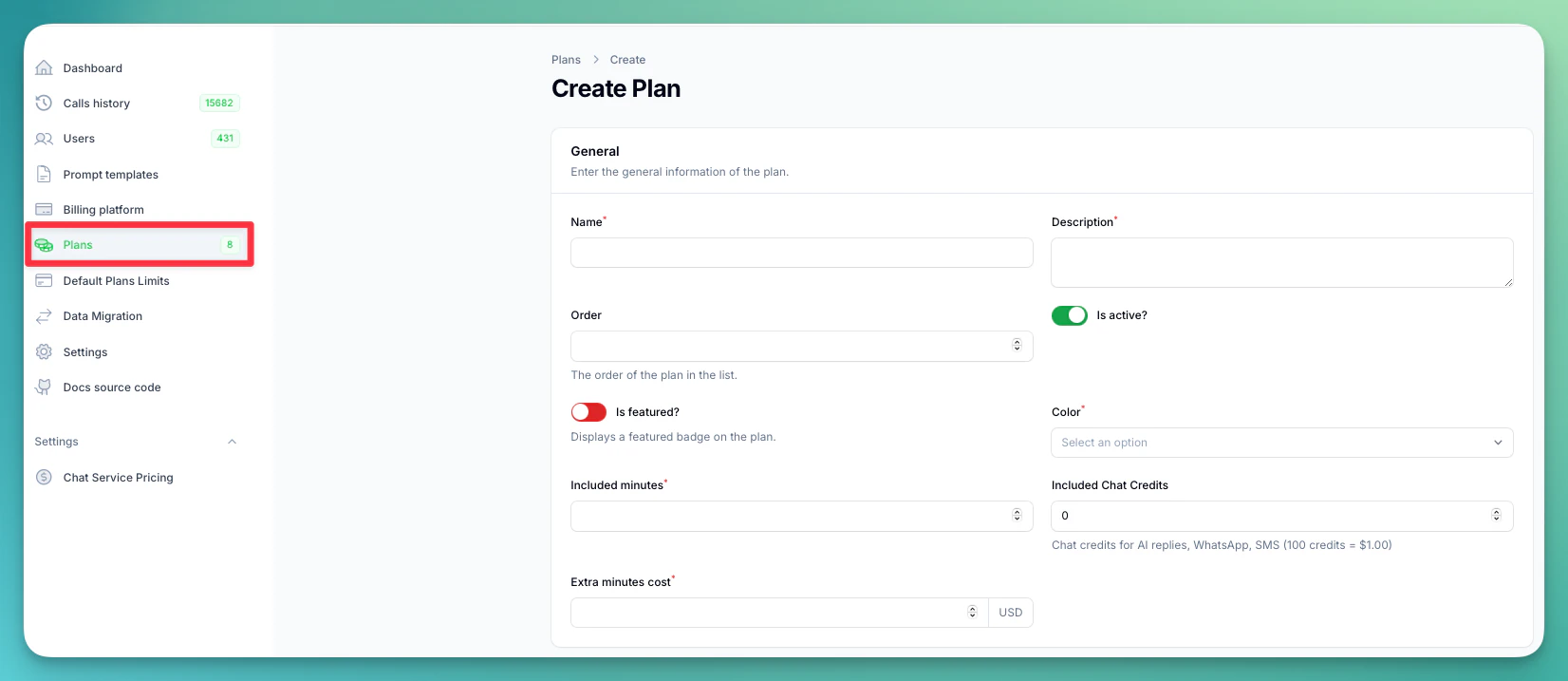
1. Open your Administration Panel
2. Navigate to "Plans" section
 ## Creating Plans
Create comprehensive pricing plans with detailed configuration options, limits, and pricing structures.
### Plan Configuration Form
## Creating Plans
Create comprehensive pricing plans with detailed configuration options, limits, and pricing structures.
### Plan Configuration Form
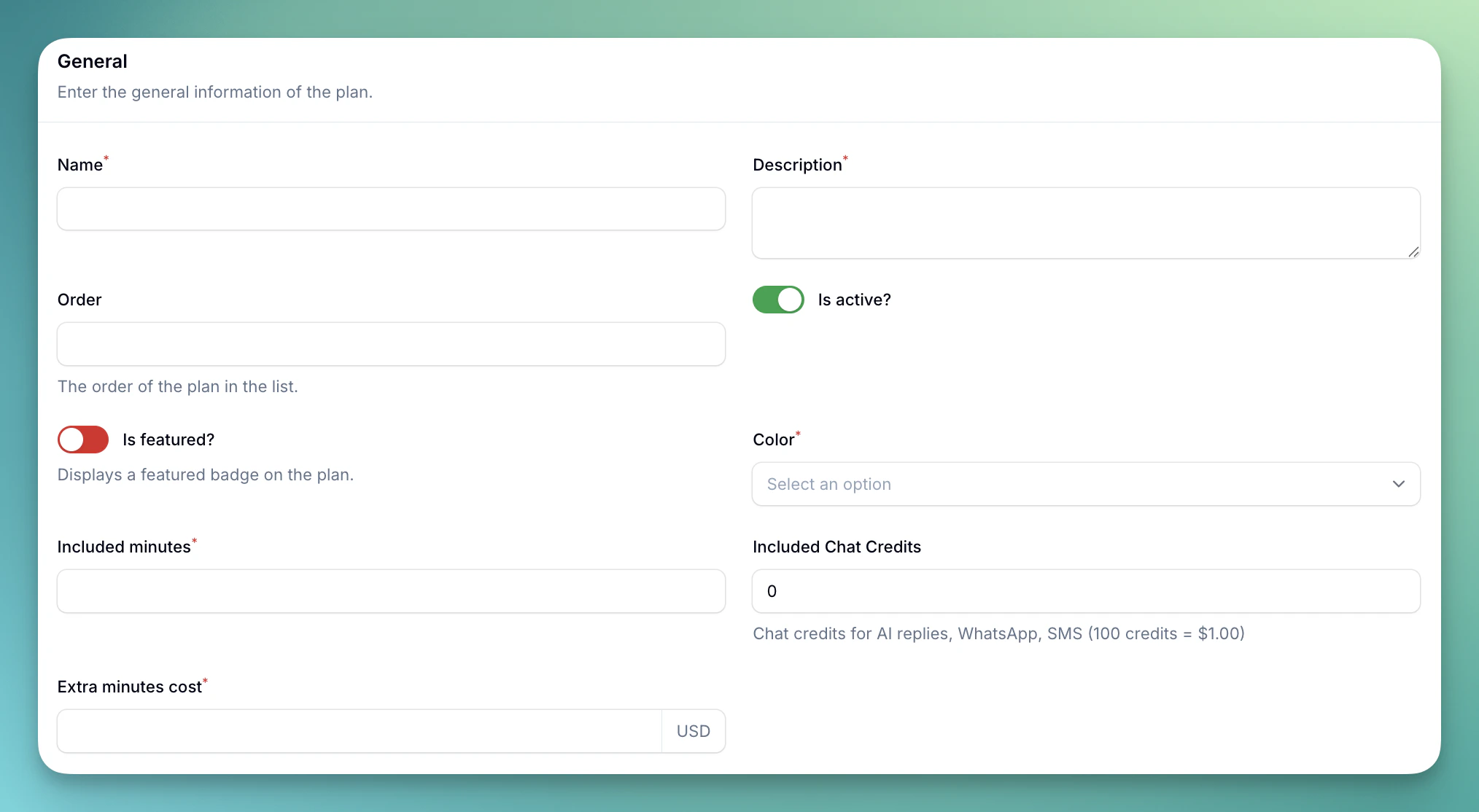 ### General Information Section
**Basic Plan Settings:**
* **Name:** Plan display name shown to customers
* **Description:** Detailed plan description and benefits (required)
* **Order:** Display order in pricing page (numeric value)
* **Is Active:** Enable/disable plan availability
* **Is Featured:** Display featured badge on plan
* **Color:** Plan theme color (Info, Success, Purple, Danger)
**Pricing Configuration:**
* **Included Minutes:** Base minutes included in plan (cannot be changed after creation)
* **Included Chat Credits:** Credits included with the plan for AI replies, WhatsApp messages, and SMS. 9 credits = 1 minute equivalent. (cannot be changed after creation)
* **Extra Minutes Cost:** Price per additional minute (minimum: your platform cost)
### Plan Limits Section
### General Information Section
**Basic Plan Settings:**
* **Name:** Plan display name shown to customers
* **Description:** Detailed plan description and benefits (required)
* **Order:** Display order in pricing page (numeric value)
* **Is Active:** Enable/disable plan availability
* **Is Featured:** Display featured badge on plan
* **Color:** Plan theme color (Info, Success, Purple, Danger)
**Pricing Configuration:**
* **Included Minutes:** Base minutes included in plan (cannot be changed after creation)
* **Included Chat Credits:** Credits included with the plan for AI replies, WhatsApp messages, and SMS. 9 credits = 1 minute equivalent. (cannot be changed after creation)
* **Extra Minutes Cost:** Price per additional minute (minimum: your platform cost)
### Plan Limits Section
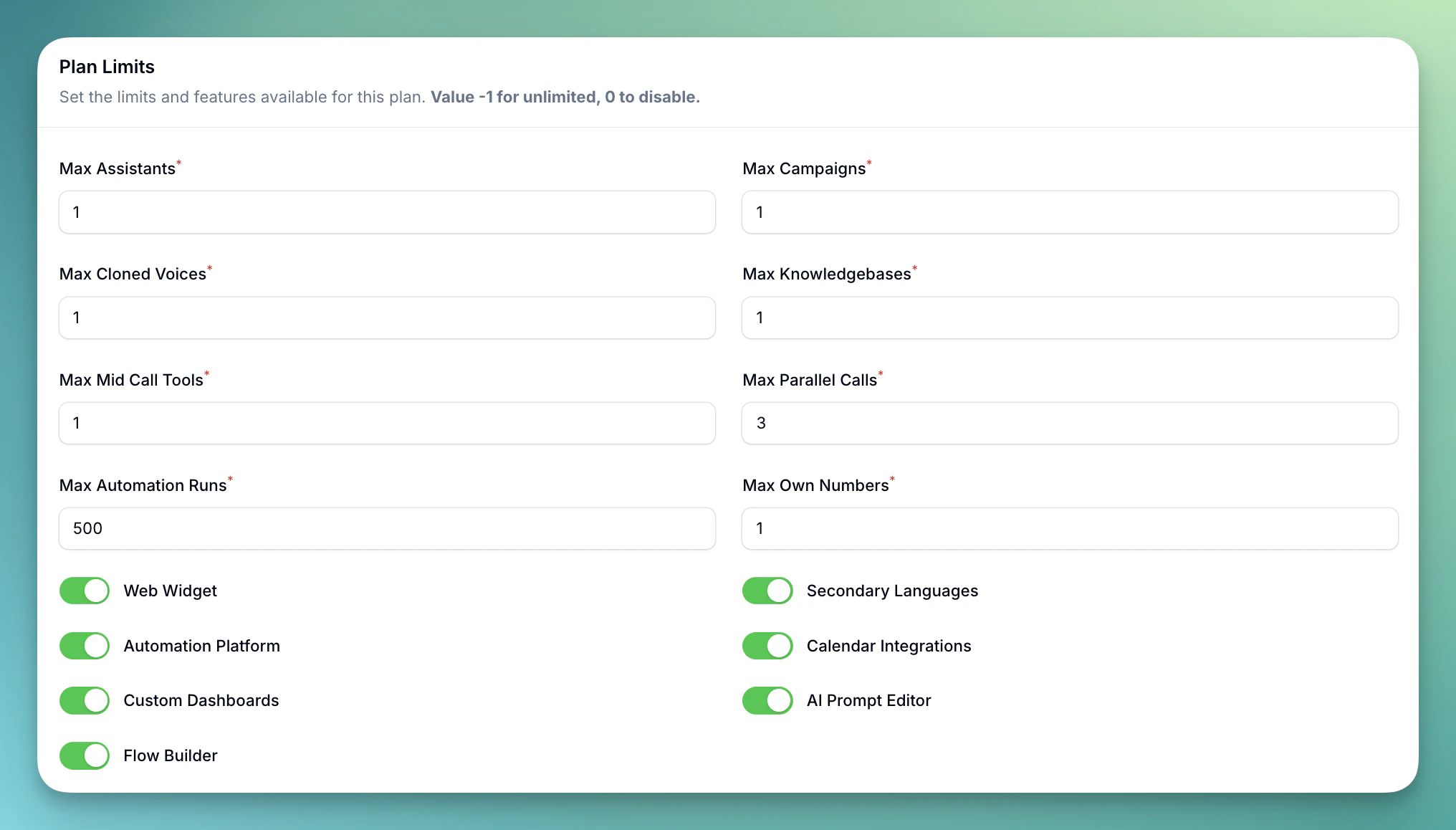 **Count-Based Limits** (Value -1 for unlimited, 0 to disable):
* **Max Assistants:** Number of AI assistants (default: 1)
* **Max Campaigns:** Outbound calling campaigns (default: 1)
* **Max Cloned Voices:** Voice cloning limit (default: 1, max: 200)
* **Max Knowledgebases:** Knowledge base documents (default: 1)
* **Max Mid Call Tools:** Custom API integrations (default: 1)
* **Max Parallel Calls:** Simultaneous calls (default: 3)
* **Max Automation Runs:** Monthly automation executions (default: 500)
* **Max Own Numbers:** Phone numbers owned (default: 1)
**Feature Toggles:**
* **Web Widget:** Embeddable web calling widget (default: enabled)
* **Secondary Languages:** Multi-language support for assistants (default: enabled)
* **Automation Platform:** Access to workflow automation tools (default: enabled)
* **Calendar Integrations:** Cal.com and GoHighLevel scheduling (default: enabled)
* **Custom Dashboards:** Build personalized analytics dashboards with widgets (default: enabled)
* **AI Prompt Editor:** Access to the AI prompt editor (default: enabled)
* **Flow Builder:** Access to the flow builder (default: enabled)
### Features Display Section
**Count-Based Limits** (Value -1 for unlimited, 0 to disable):
* **Max Assistants:** Number of AI assistants (default: 1)
* **Max Campaigns:** Outbound calling campaigns (default: 1)
* **Max Cloned Voices:** Voice cloning limit (default: 1, max: 200)
* **Max Knowledgebases:** Knowledge base documents (default: 1)
* **Max Mid Call Tools:** Custom API integrations (default: 1)
* **Max Parallel Calls:** Simultaneous calls (default: 3)
* **Max Automation Runs:** Monthly automation executions (default: 500)
* **Max Own Numbers:** Phone numbers owned (default: 1)
**Feature Toggles:**
* **Web Widget:** Embeddable web calling widget (default: enabled)
* **Secondary Languages:** Multi-language support for assistants (default: enabled)
* **Automation Platform:** Access to workflow automation tools (default: enabled)
* **Calendar Integrations:** Cal.com and GoHighLevel scheduling (default: enabled)
* **Custom Dashboards:** Build personalized analytics dashboards with widgets (default: enabled)
* **AI Prompt Editor:** Access to the AI prompt editor (default: enabled)
* **Flow Builder:** Access to the flow builder (default: enabled)
### Features Display Section
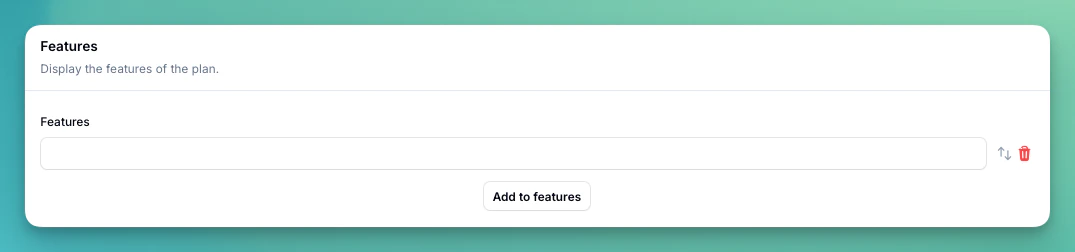 **Plan Features List:**
* Add up to 15 custom features per plan
* Each feature limited to 80 characters
* Features appear as bullet points on pricing page
* Use descriptive benefits and capabilities
**Common Feature Examples:**
* "120 included minutes, then \$0.20 / extra minute"
* "1 assistant"
* "1 outbound campaign"
* "3 calls in parallel"
* "1 cloned voice"
* "24/7 Customer Support"
### Adding Prices to Plans
After creating a plan, scroll down to the **Prices** table:
**Plan Features List:**
* Add up to 15 custom features per plan
* Each feature limited to 80 characters
* Features appear as bullet points on pricing page
* Use descriptive benefits and capabilities
**Common Feature Examples:**
* "120 included minutes, then \$0.20 / extra minute"
* "1 assistant"
* "1 outbound campaign"
* "3 calls in parallel"
* "1 cloned voice"
* "24/7 Customer Support"
### Adding Prices to Plans
After creating a plan, scroll down to the **Prices** table:
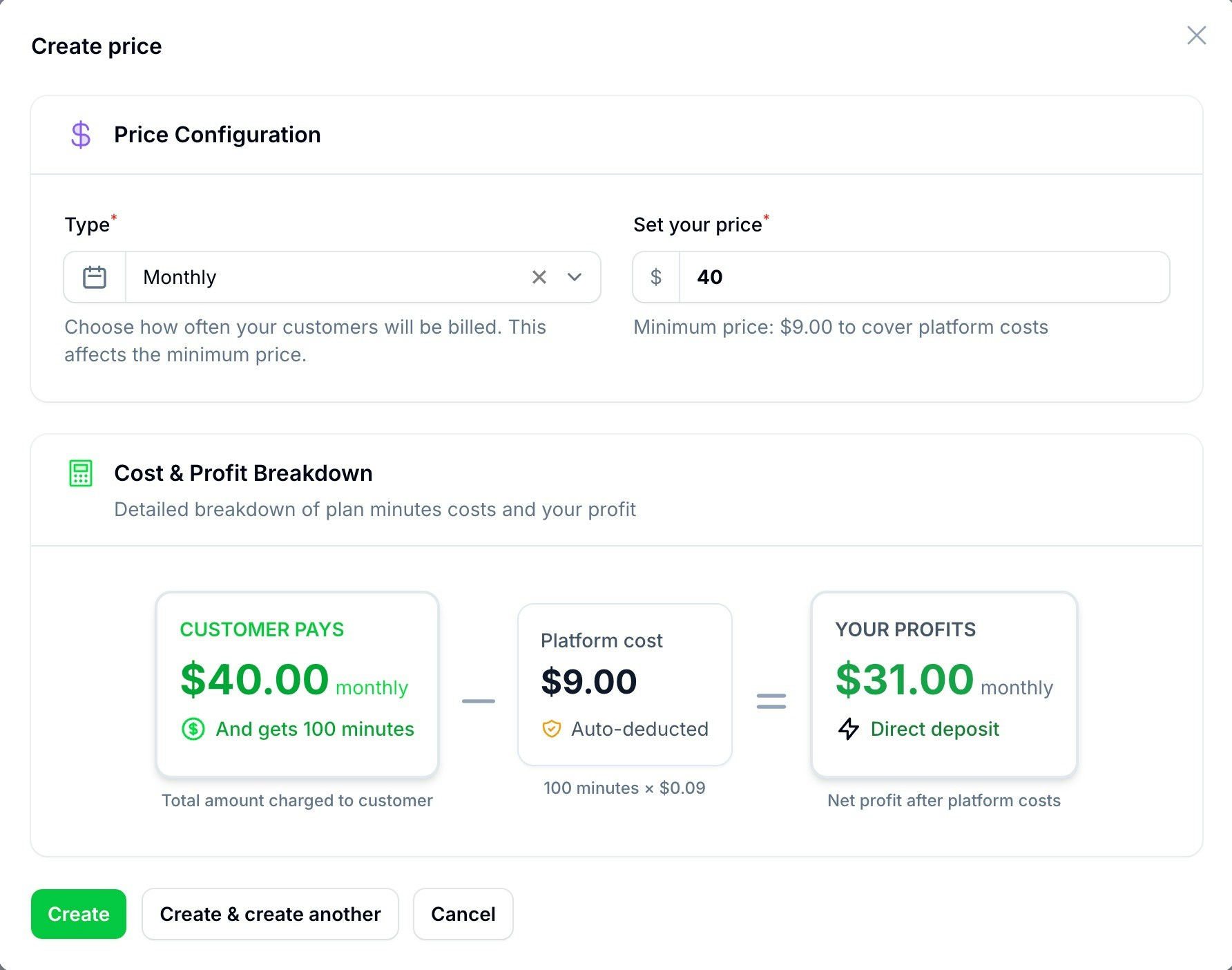 **Price Configuration Interface:**
* **Billing Type:** Monthly or Yearly (can have both options)
* **Set Your Price:** Customer price with automatic cost validation
* **Cost & Profit Breakdown:** Real-time calculation showing platform costs and your profit
## Default Plan Limits
Navigate to **Default plan limits** in the sidebar to configure global settings:
**Price Configuration Interface:**
* **Billing Type:** Monthly or Yearly (can have both options)
* **Set Your Price:** Customer price with automatic cost validation
* **Cost & Profit Breakdown:** Real-time calculation showing platform costs and your profit
## Default Plan Limits
Navigate to **Default plan limits** in the sidebar to configure global settings:
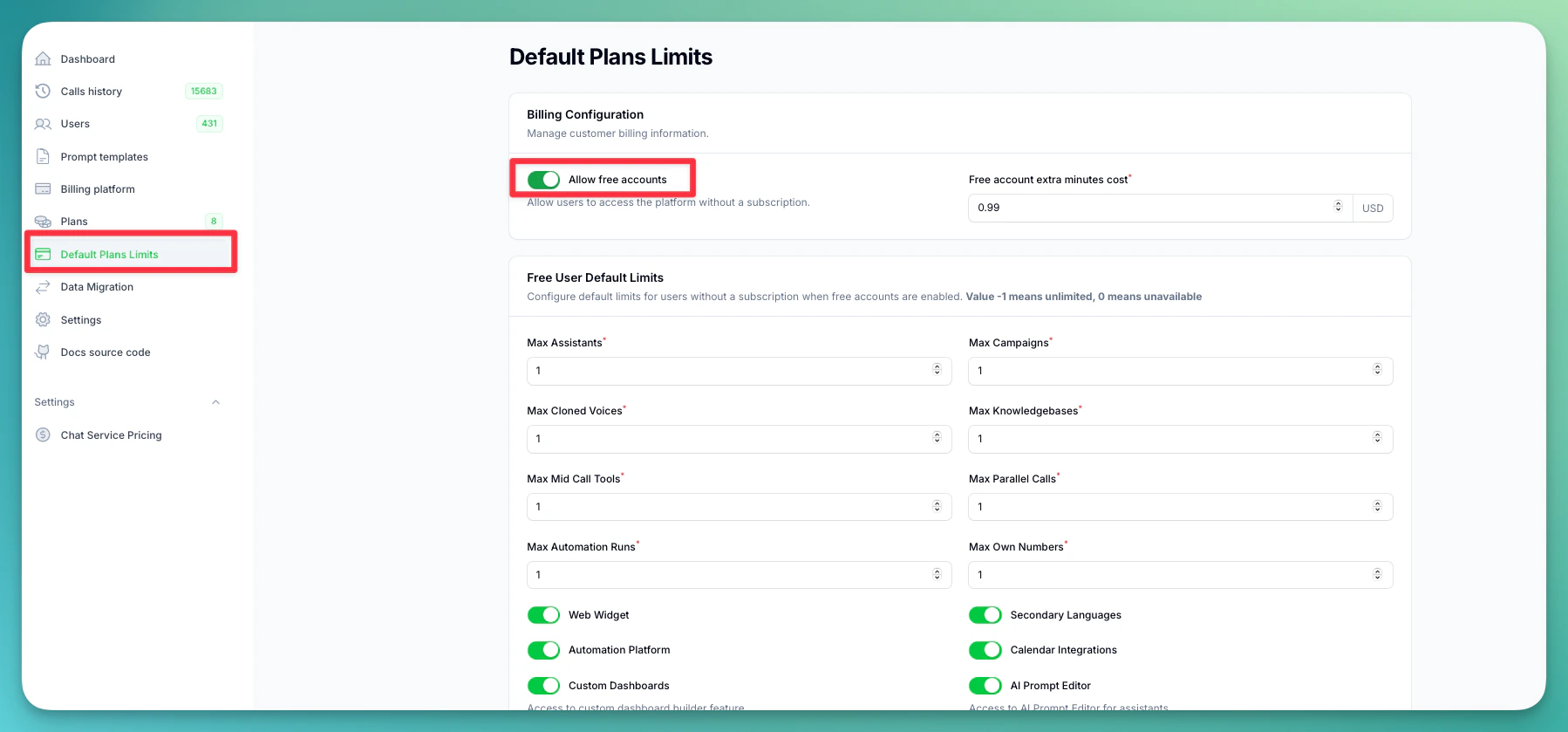 ### Billing Configuration
**Free Account Settings:**
* **Allow Free Accounts:** Enable users to register without payment
* **Free Account Extra Minutes Cost:** Price per additional minute for free users
### Default Limits
### Billing Configuration
**Free Account Settings:**
* **Allow Free Accounts:** Enable users to register without payment
* **Free Account Extra Minutes Cost:** Price per additional minute for free users
### Default Limits
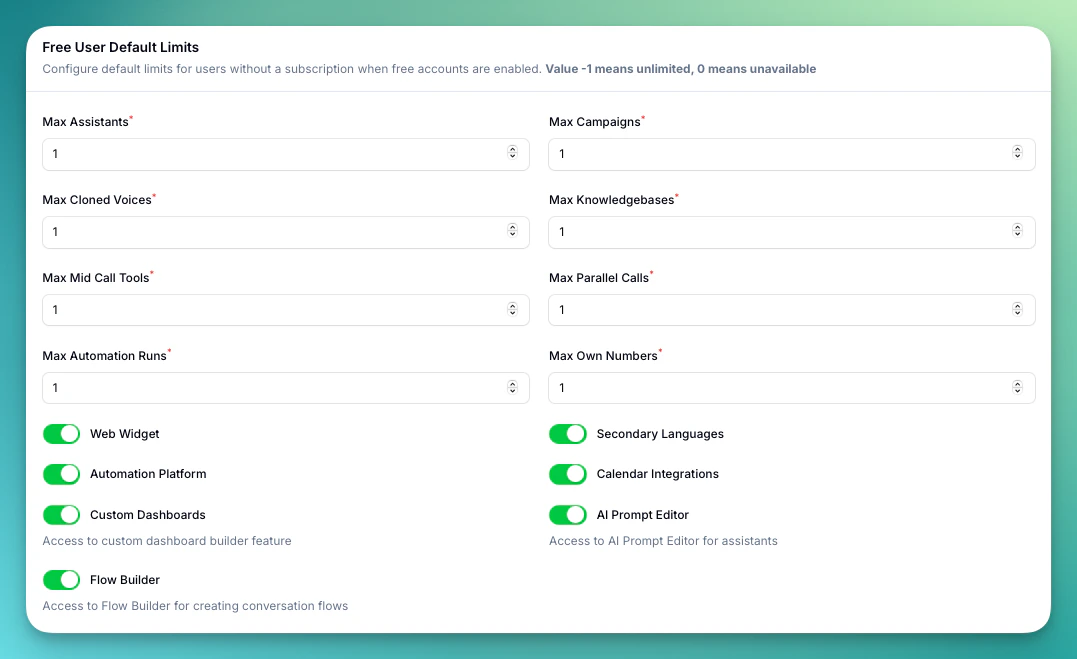 Configure baseline limits applied to all new plans:
* **Max Assistants, Campaigns, Cloned Voices**
* **Max Parallel Calls, Knowledge Bases, Own Numbers**
* **Max Mid Call Tools, Automation Runs**
* **Feature toggles:** Web Widget, Secondary Languages, Automation Platform, Calendar Integrations, Custom Dashboards, AI Prompt Editor, Flow Builder
### Plan Structure
* Start with 2-3 clear tiers
* Offer monthly and annual options
* Include reasonable usage limits
* Provide clear upgrade paths
### Pricing Strategy
* Research market rates
* Consider your costs
* Plan for scalability
* Include profit margins
### Feature Distribution
* Clearly differentiate tiers
* Reserve premium features
* Balance value proposition
* Consider upsell opportunities
## Testing Plans
Before launching:
* Create test accounts
* Try different plan combinations
* Test upgrade/downgrade flows
* Verify billing accuracy
Start with competitive pricing and adjust based on market response and usage patterns.
Configure baseline limits applied to all new plans:
* **Max Assistants, Campaigns, Cloned Voices**
* **Max Parallel Calls, Knowledge Bases, Own Numbers**
* **Max Mid Call Tools, Automation Runs**
* **Feature toggles:** Web Widget, Secondary Languages, Automation Platform, Calendar Integrations, Custom Dashboards, AI Prompt Editor, Flow Builder
### Plan Structure
* Start with 2-3 clear tiers
* Offer monthly and annual options
* Include reasonable usage limits
* Provide clear upgrade paths
### Pricing Strategy
* Research market rates
* Consider your costs
* Plan for scalability
* Include profit margins
### Feature Distribution
* Clearly differentiate tiers
* Reserve premium features
* Balance value proposition
* Consider upsell opportunities
## Testing Plans
Before launching:
* Create test accounts
* Try different plan combinations
* Test upgrade/downgrade flows
* Verify billing accuracy
Start with competitive pricing and adjust based on market response and usage patterns.